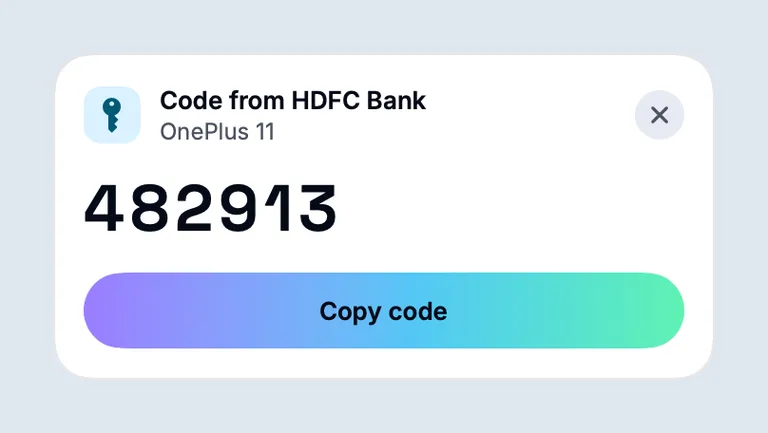
Turn on Codes from messages on the Mac. When a sign-in code arrives by text or in an email notification, a card shows it on the Mac with a Copy code button. A model on your Mac reads them.
Written for Bridgey beta 19, 1 Nov 2026.
Turn it on
On the Mac, open Settings > Notifications > Codes from messages and turn on Show codes from text messages.
Under Read codes, keep On this Mac (private). It downloads a small model once (253 MB).
On Android 15 and later, open Settings > Notifications > Codes from messages on the phone and tap Link this phone to the Mac, then Allow. Android hides code text from apps it has not linked.
The phone shows Code access: allowed when it is ready.
Codes from email
Codes in Gmail, Outlook, Proton Mail and Spark notifications show on the same card. They are always read by the model on your Mac. The same code from a text and an email shows once.
One click to copy
The card floats in the corner for 60 seconds and never takes focus, so Command-V pastes where you were. A newer code replaces it.
The cloud option
If you choose Cloud instead, the text of a code message goes through Round Robin’s relay to a cloud model, which keeps no logs. What leaves your devices
Who reads your codes
Who reads my messages to find the code?
A small model on your Mac, by default. If you choose the cloud option instead, the text of a code message goes through Round Robin’s relay to a cloud model. Codes from email are always read on the Mac.
Which email apps work?
Gmail, Outlook, Proton Mail and Spark notifications on your phone.
What happens to a copied code?
It stays on the Mac, is marked so clipboard managers skip it, and is cleared from the clipboard after 60 seconds. Codes are never written to logs.
Install the beta on your phone and your Mac.
Free and open source, no account. Homebrew, Obtainium and checksums are on the download page. All the ways to install