- Bridgey
- Download
Get the Bridgey beta.
Free and open source, no account. Beta 19 is the newest build; there is no stable release yet.
For macOS 13+ and Android 8.0+. Beta 19; there is no stable release yet.
On the Mac
Needs macOS 13 or later. Homebrew or the DMG; both install the same app.
Homebrew
brew install --cask round-robin-solutions/tap/bridgey-rrIt installs the newest beta and lets it open. The app updates itself after that. To remove it and its data:
brew uninstall --cask --zap bridgey-rrMac download
Open the DMG and drag Bridgey by Round Robin to Applications. The first time, right-click it and choose Open: it is not signed with an Apple Developer ID yet, so macOS asks once. Then allow local network access.
Download the DMG
On the phone
Needs Android 8.0 or later. The APK, or Obtainium to keep it up to date.
Android download
Download the APK on the phone and open it. Android asks once to allow installs from your browser. The app is called Bridgey RR on the home screen.
Download the APKSHA256SUMS, to check the fileObtainium
With Obtainium installed, open the Beta link on the phone. It adds Bridgey and fetches each new beta from GitHub. Android still asks before every install.
Add the Beta to Obtainium
Then pair them once.
On the same Wi-Fi the first time. After that they find each other on their own, at home or away.
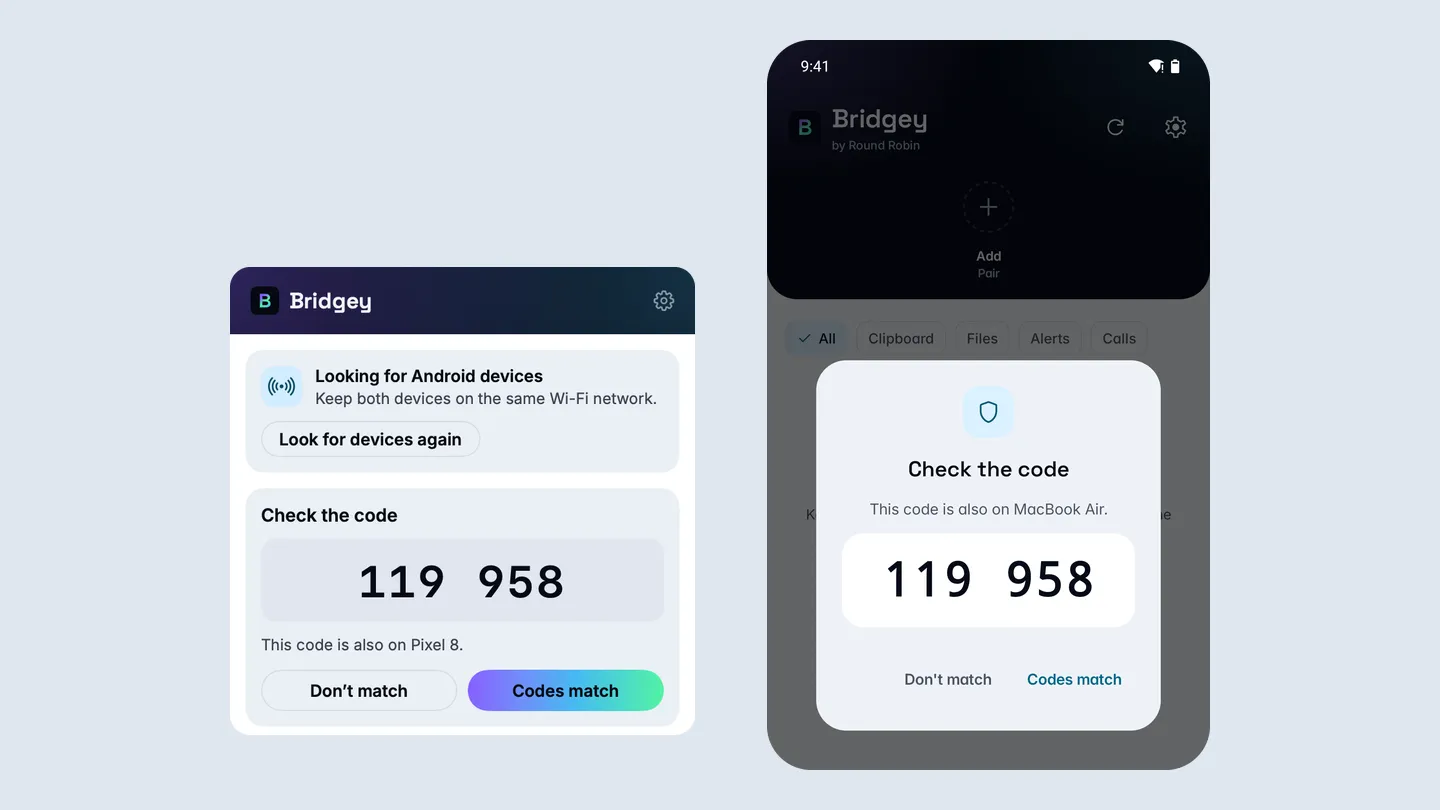
- Open Bridgey on both. The Mac’s menu-bar panel lists nearby phones.
- Pick the other device on either side. On the phone it is Add on the home screen.
- Both screens show a six-digit code. If they match, press Codes Match on the Mac and confirm on the phone. If they differ, cancel.
Betas, updates and the original
Beta only, for now
Every build so far is a beta. The newest is beta 19, from 1 Nov 2026. To get each one, choose Beta in Settings > Updates.
Release notesUpdates are checked
On Android an update must match its checksum and the installed app’s certificate. On the Mac it must carry a valid signature.
Privacy and securityNext to the original
It installs beside Bridgey by Semyon Mikhailov and pairs with it. Run one at a time on a Mac: they share a port.
The original BridgeyAll the files
Every build, with the Mac ZIP and the checksums, is on GitHub.
Releases on GitHub
Once it is running
- Transfer photosOpen your Android phone’s photos on your Mac over Wi-Fi and drag them out, or send them from the phone.
- Copy and pasteCopy on the Mac and paste on your Android phone, or the other way.
- Not showing upYour Mac cannot find your Android phone, or it drops overnight? Fixes for Bridgey: local network access, sleeping phones, notification access, codes and more.